










AI is rapidly changing how integrations are designed and built. In this article, we summarize the key areas where AI is making a difference, based on what Digia’s integration architects see in their work right now. We will cover agents, agent ecosystems, AI security when building integrations, and how to skill up your team.

Read the summary (AI-generated, human-reviewed)
- AI accelerates and improves integration work, including design, development, operations, and governance & security.
- Agents are transforming integrations both as helpers for building integrations and as consumers of integrations across multiple AI ecosystems.
- AI skills are critical for integration, and teams should take these skills on the roadmap, if not already there.
Main areas AI is influencing in integrations
You could rightfully ask if there isn’t some field that AI isn’t influencing. But the main areas we see right now are:
Design
- Creating integration specifications. We make the architectural decisions, but AI can give good advice while doing that.
- Documenting integrations. AI can help draw diagrams when using text-based diagramming tools like Mermaid.
- Understanding older code. Especially in migrations, AI can be extremely helpful in understanding what has been done before.
Development
- Integration IDE AI support. Tools like GitHub Copilot, Claude, Cursor, and others are gradually taking over the actual typing of the code, and it doesn't stop at traditional coding. Most iPaaS vendors now offer AI-assisted flow generation, mapping, and coding assistance.
Operations
- Integration platform, ITSM system, and monitoring system AI support. When there’s a problem, AI can help by combining information from logs in a way that would take much longer manually.
Governance & security
- Compliance, governance standard, and security monitoring. AI can help monitor things like GDPR violations or perform security reviews for your code or infrastructure as code.
How agents help design and build integrations
In integration work, it’s crucial to move beyond using mere chat interfaces and adopt full-blown agents.
Agents can have memory, use tools, and may not have a user interface type prompt at all. They can, for example, call APIs, execute code, and be accessed by other applications. They may be triggered by events instead of user input.
For understanding unstructured data, like documents, agents can expand their knowledge by using Retrieval Augmented Generation (RAG). This is a key element in modern AI agents and basically a way to structure document-based and other information that is not in a well-defined format for the agent to use as a knowledge base.
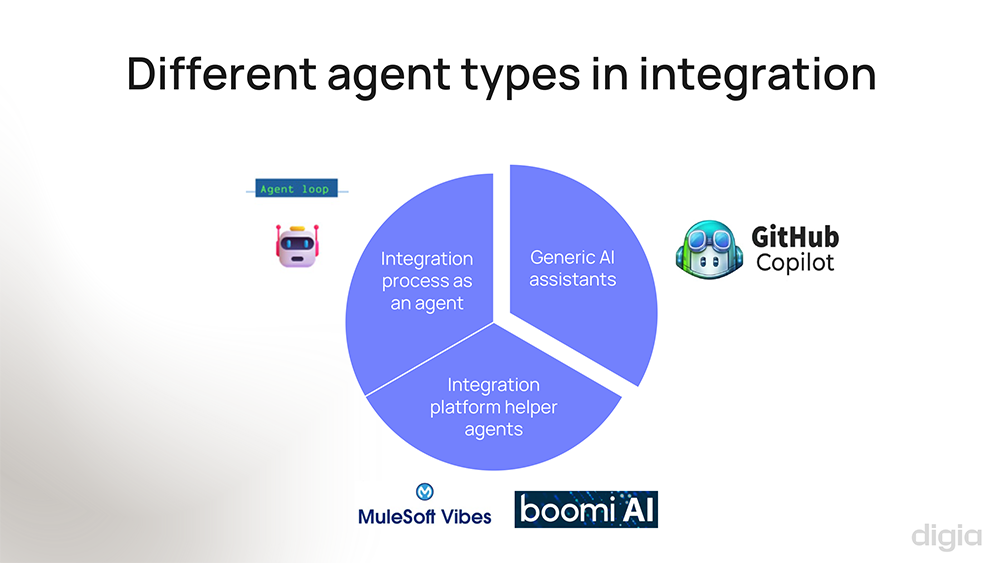
We have recognized three types of agents in integration work:
-
Generic AI agents, like GitHub Copilot. These make open-source integration platforms really shine: they strip away much of the manual effort while all the flexibility is preserved.
-
Integration platform helper agents. Many modern integration platforms are Integration Platform as a Service (iPaaS) low-code systems and may have some representation of the integration logic using languages like XML, YAML, or JSON. The structure of the configuration is very proprietary to each platform, so it’s hard to generate very good definitions outside the platform using only generic knowledge that a language model has. What you’ll need are the specific agents provided by your iPaaS vendor, for example MuleSoft Vibes or Boomi AI. They specialize in the integrations and configurations used by those technologies.
-
Integration process as an agent. An interesting type of thought experiment is thinking about integration flows as agents themselves. There are some examples already, for example Microsoft Logic Apps Agent Loop implements this kind of feature. Instead of having traditional deterministic integration flow, you can have these agent-based flows that could be prompt-based or autonomic. This is an emerging area at the moment.
The other way around: how can integrations support agents?
Businesses are building agents for many purposes right now, and we as integration professionals are often asked to support these kinds of agents.
In this case, the agents are not helping in the actual integration work, but vice versa: the agents need integrations to work.
Here’s how integrations can help:
Agent tool support. Agents can and often need to call other tools, but how do you expose these other tools to the agents? Your integration platform or API management solutions could be a way to expose these tools to agents in a reusable way.
Agent data ingestion. We can also help ingest the data agents need. This can be external data that cannot be accessed in real-time as an API call. It could be documents, wiki pages etc. that need to be input in a RAG which we mentioned earlier. Instead of using a custom solution, this is integration work that can be implemented using an integration platform.
Agents in different ecosystems. Agents are being built in different ecosystems, for example in Amazon Bedrock, Google Gemini Enterprise, and Salesforce Agentforce. It’s quite easy to get into a situation where you have multiple agents on multiple different platforms. And these agents are not just working on their own: they use other tools and call other agents within the same ecosystem or outside it.
As long as you are working within a single ecosystem, there are usually good tools for agents to call each other. But sooner or later, you probably need to start making calls across the ecosystems. There may not be a standardized way of doing that, and that’s not in the incentives of all actors. There are some emerging standards that you definitely should take a look at once you get to this stage of “agent sprawl”, for example MCP (model context protocol) to call the tools and A2A (agent-to-agent protocol) for calling other agents.
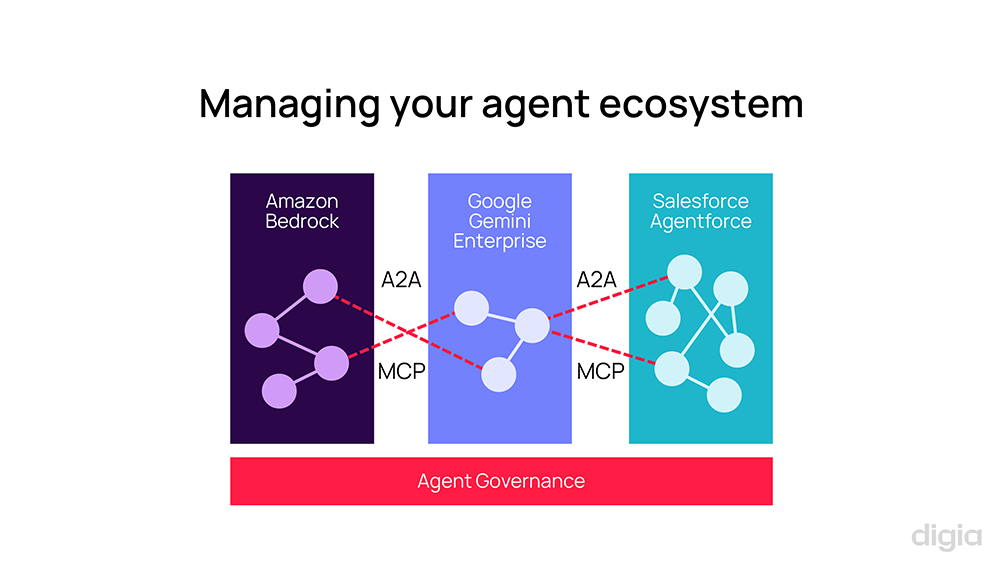
This brings us to agent governance. Like APIs, you will want to ensure that agents are built in a secure way across all these environments. You might want to monitor them. You might want to have a catalog of agents, so you know what has been built and what you can re-use. Many modern API management platforms now include AI gateway-style features for MCP support or LLM token usage tracking, but not all of them support the wider agent governance layer.
AI security when building integrations
Concerns about AI use include questions like:
- Is our data safe when we use AI?
- How to ensure AI is used securely?
- Is code produced by AI safe from IPR perspective?
- How to tackle the non-deterministic nature of LLMs?
There are great resources for the above questions that can go much deeper than this article. Here, we want to highlight two security aspects that are specifically related to integrations:
Concerns over AI agents accessing APIs. If you’re using agents to access APIs, how could you ensure that’s done safely? We recommend solving this in the same way as when using APIs for other tools. A good API management solution can go a long way. Role-based access control is essential. Sensitive data should be filtered or masked. API gateway policies can also help in restricting traffic.
Vulnerabilities using AI as part of integration. How can we prevent introducing vulnerabilities when using AI to generate code? AI-generated code needs to be treated exactly like code written by an unfamiliar developer, with the same review and test practices as guardrails. That means validating the inputs and sanitization of the parameters you receive. Additionally, for LLM usage, AI guardrails should be used that ensure AI works as intended and doesn’t return results that may be wrong or harmful. Both automatic and human review will be very important, as well. And in the future, AI agents can help us in reviewing integration solutions too.
AI skills for integration & recommendations for your team
According to Gartner, AI skills are not yet core skills required for integration architects or developers, but so-called emerging skills. We see them moving quite soon nearer to the core.
Your integration team needs to take these skills on the roadmap, if they are not already there.
Recommendations for teams that are just starting their AI journey:
-
AI fundamentals. We think it’s very useful, as integration architects and developers, to understand the whole landscape and how our work fits within it. If you’re not familiar with large language models, retrieval augmented generation, or any of the other topics we have discussed here, find a course or resources to learn more.
-
Prompt engineering. Knowing how to refine your AI prompts and deliver enough context is very important. A constantly improving team prompt playbook is essential for onboarding AI properly, and we feel prompt engineering is a specific skill that is core to using modern AI effectively.
-
Integration platform AI. What is your main modern integration platform, and what AI tools are available there? Not everything we showed here is available for each technology. Investigate the AI roadmap with your vendor and evaluate whether it meets your requirements.
-
IDE AI code assistant. Probably the first thing you should take into use is an AI code assistant to help you build integrations. Even if you’re using low-code. Take the assistant into daily use, get familiar with it, and share tips with your colleagues.
Recommendations for more advanced teams:
-
Learn custom AI assistants and agents, and their use cases for your own platform.
-
Create a custom AI assistant. For example, just to test how the technology works, create a simple train traveling assistant that you can ask questions from.
-
Integrate RAG to search knowledge, for example train schedules.
-
Create an MCP server based on an existing API that does some action for you, like exports the planned train journey times to your calendar.
We feel that these tools are best learned by trying out things for your own small use cases. And when you know the tools, you have a better idea of what they can do. Then, use your human superpower to come up with ideas where such AI workflows might be the most useful in your organization.
For agents, you could experiment with tools such as Copilot Studio, Google Gemini Enterprise, and tools specific for your iPaaS.
Summary: how to move forward with AI in integrations
To summarize everything we’ve covered in this article, here are some recommendations for your next steps.
Integration for AI services:
-
Ensure AI tools receive quality data by building a robust integration platform.
-
Verify that your API management solution supports scalability and security for AI-driven integrations.
AI-augmented integration:
-
Adopt iPaaS AI assistant features for day-to-day integration work.
-
Run small pilots and measure impact.
-
Bake in guardrails and security from the start.
Enabling AI for development teams:
-
Learn about AI and experiment with the current AI features of your integration platform.
-
Plan for AI as a resource in your project.
Want to learn more?
Explore our integration services and get in touch. We’ll help you build change-capable architectures.
See also the related webinar: AI in integrations